Key Takeaways
- Ready-made LMS platforms suit standard courses, tight budgets, and fast launches.
- Custom LMS development pays off when your workflows, integrations, or business model don’t fit a generic product.
- Compare three-to-five-year ownership costs, not just the first invoice.
- Connected web, mobile, and SaaS layers cut admin work, improve the learner experience, and keep you competitive as the market shifts.
- In the UAE, check bilingual (Arabic and English) support, data residency, and privacy obligations before you commit to either route.
- Validate before you build. Map user journeys, test shortlisted platforms, and find the real gaps first.
A language academy in Dubai launches with a ready-made LMS. For the first year, it works beautifully. Courses go live in a week, quizzes run themselves, and certificates download automatically.
Then growth arrives. Enrolments double. A corporate client wants its own branded portal. Parents want progress updates on their phones, in Arabic and English. By Friday afternoon, someone is stitching enrolment spreadsheets together for invoicing.
That’s the moment the real question surfaces. Do you keep configuring the platform you have, switch to another ready-made product, or invest in custom LMS development?
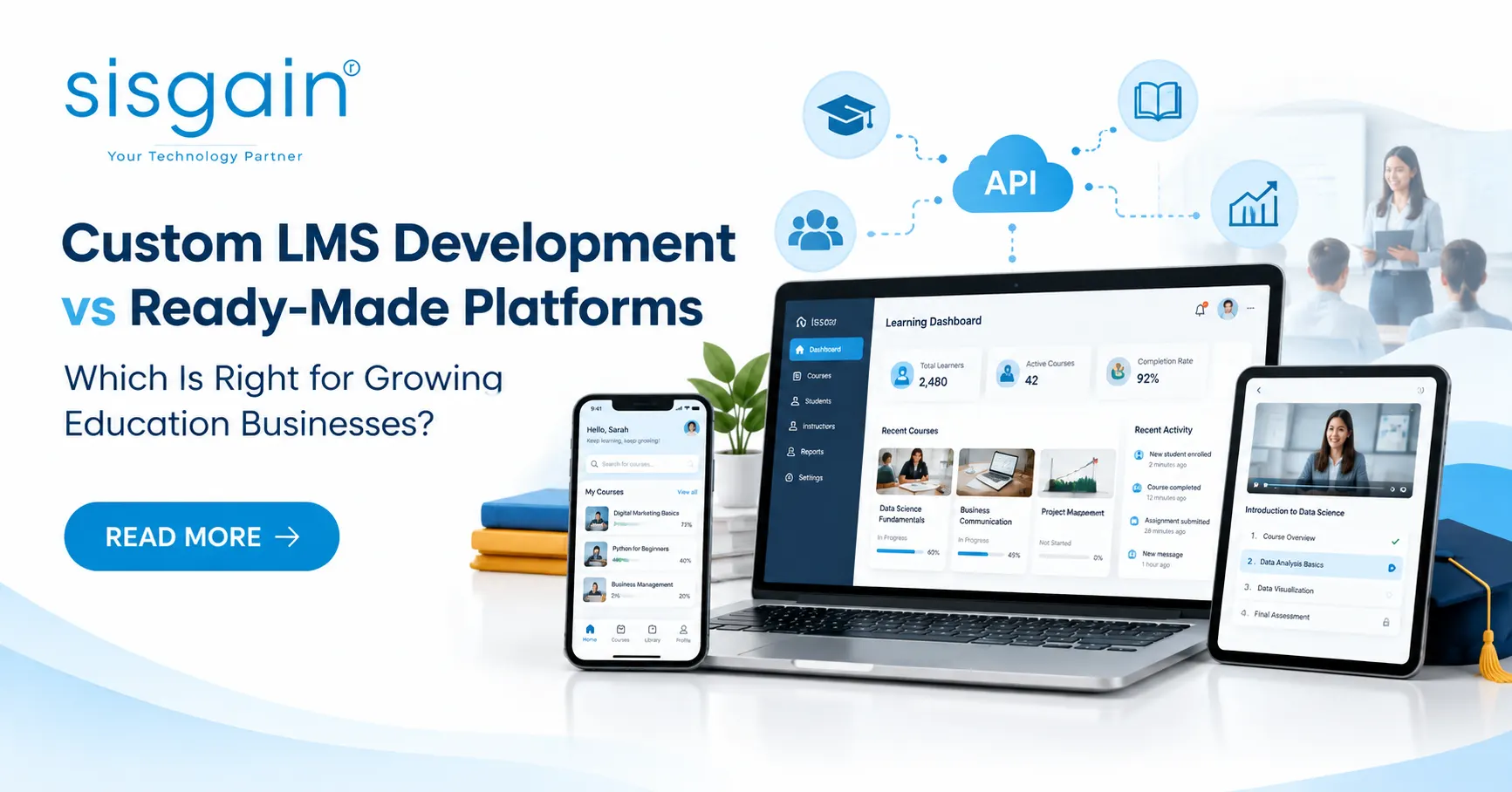
There’s no universal answer. The right call depends on your business maturity, workflow complexity, growth plans, budget, and in-house technical capacity. This guide compares cost, customisation, scalability, mobile and web experiences, integrations, and maintenance, and gives you a practical framework for custom LMS development vs ready-made LMS and a clear view of how to choose an LMS for an education business like yours.
What Is the Difference Between Custom LMS Development and Ready-Made Platforms?
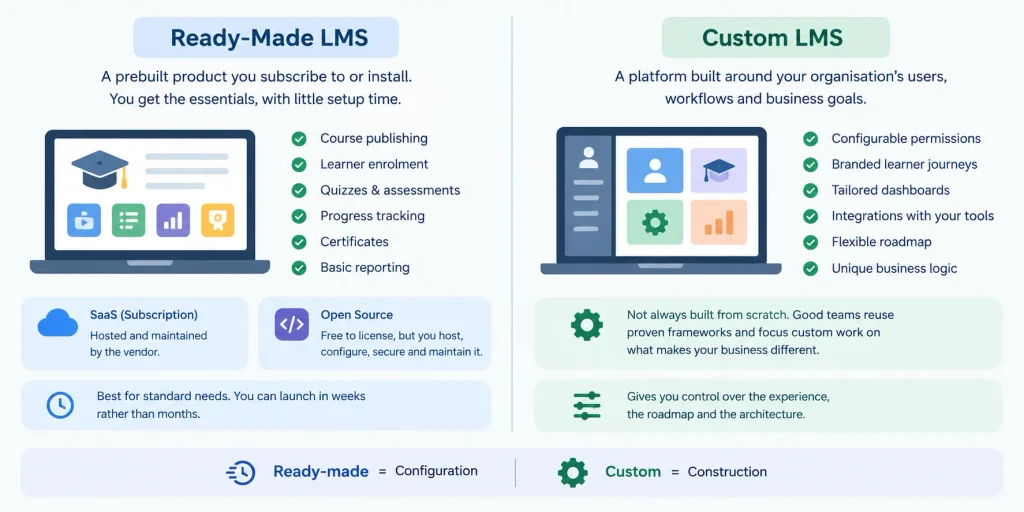
In short: a ready-made LMS is a finished product you configure, while a custom LMS is a platform built around your specific users, workflows, and business model.
What Is a Ready-Made Learning Management System?
A ready-made LMS is a prebuilt product. You subscribe to a hosted service, or you install an open-source platform and run it yourself.
Most cover the essentials: course publishing, learner enrolment, quizzes, progress tracking, certificates, and basic reporting. If your workflow is fairly standard, that’s often enough, and you can launch in weeks rather than months.
One distinction matters. A subscription LMS (SaaS) is hosted and maintained by the vendor. An open-source platform is free to license but rarely free to run: someone has to host, configure, and secure it, and fix it when a plugin breaks.
What Is Custom LMS Development?
Custom LMS development means designing a learning management system around your organisation’s actual users, learning models, and business objectives. Think configurable permissions, branded learner journeys, tailored dashboards, and integrations built for the systems you already use. It doesn’t mean every line of code starts from zero. Good teams reuse proven frameworks and services, and spend custom effort on what makes your business different.
That’s the core of custom LMS vs off-the-shelf LMS: configuration versus construction. And the custom LMS vs SaaS LMS question is really about control. A SaaS LMS gives you speed and convenience. A custom platform gives you ownership of the experience, the roadmap, and the architecture.
Custom LMS vs Ready-Made LMS: A Side-by-Side Comparison
Here’s how the two routes compare across the factors that matter most to growing education businesses.
| Decision factor | Ready-made LMS | Custom LMS |
|---|---|---|
| Initial investment | Usually lower | Usually higher |
| Time to launch | Generally faster | Depends on scope and complexity |
| Customisation | Limited by product features and configuration | Designed around your defined requirements |
| Integrations | Existing connectors and supported APIs | Integration scope can be tailored |
| User experience | Standard interface with branding options | Full control over user journeys |
| Scalability | Depends on vendor architecture and plan | Architecture designed for anticipated growth |
| Maintenance | Vendor handles most core platform upkeep | Ownership and support must be planned |
| Data control | Depends on hosting, contracts, and export tools | Greater architectural control, subject to governance choices |
| Mobile and web experiences | Depends on the platform’s existing features | Designed around specific user needs |
| Long-term costs | Subscriptions, add-ons, upgrades, usage charges | Development, hosting, support, and enhancements |
Why the Cheapest Starting Option Isn’t Always the Best Long-Term Choice
A low monthly fee looks great in a spreadsheet. But initial price and total cost of ownership are different numbers.
Subscriptions often grow with learner counts. Premium integrations, storage, advanced reporting, and API access can sit behind higher tiers. Workarounds cost staff hours, and outgrowing the platform means a migration project.
Custom development flips the pattern: more upfront, then hosting, maintenance, and engineering support afterwards. Neither route is automatically cheaper, which is why the custom LMS development cost conversation should start with total ownership rather than a quote.
When Is a Ready-Made LMS the Better Choice?
Choose a ready-made LMS when requirements are standard, timelines are short, or the technical team is small. For many education businesses it’s the right starting point, and we’d say so even as a development company.
Standard Learning Requirements and Faster Launches
If course delivery, quizzes, certificates, and basic reports cover what you need today, a prebuilt platform gets you live quickly. That suits training providers validating demand. Why spend months building a platform for a course nobody has bought yet?
Limited Budgets and Smaller Technical Teams
Subscription platforms remove much of the infrastructure burden. Vendor updates, support, and predictable pricing are real advantages, though terms vary. Read the contract, and check what happens to your data if you leave.
When Configuration Is Enough
Branding options, plugins, and supported integrations can close a surprising number of gaps. Before committing to any build, test your essential workflows in the strongest candidates. This is where LMS customization vs custom development gets decided in practice: if configuration handles 90% of what you need without painful workarounds, a custom build is hard to justify.
Quick question: “Can we start with a ready-made LMS and move to a custom platform later?”— Yes, if you plan for it. Choose a platform with full data export and open APIs, document your workflows early, and avoid heavy lock-in. A planned migration is far cheaper than a forced one.
When Does Custom LMS Development Make More Sense?
Custom LMS development makes more sense when the platform is part of your competitive advantage, or when a generic product forces manual work. Four situations tend to tip the balance.
Your Learning Model Doesn’t Fit Standard Workflows
Cohort-based programmes, adaptive pathways, complex assessments, instructor-led sessions, specialist certifications, and blended delivery are hard to squeeze into a generic template. Try anyway, and staff end up doing manually what the system should do.
Your Education Business Needs Greater Product Control
Perhaps you run white-label environments for several schools or corporate clients, or need subscription billing and reporting built around your own metrics. That’s where multi-tenant architecture helps: one platform serves many organisations, each with separate branding, data, and permissions.
Integrations Have Become Business-Critical
Student information systems, CRM, payment gateways, identity providers, video conferencing, and analytics tools all need to talk to each other. When these connections drive daily operations, they should shape the architecture from discovery, not get bolted on afterwards.
You Need a Long-Term Product Roadmap
If you plan proprietary learning experiences, deeper data access, or features competitors can’t copy by buying the same subscription, you need control over development priorities. A custom platform gives you that.
Custom development is justified when expected business value outweighs both the cost and the operational responsibility. Businesses weighing this up in the UAE often work with a custom LMS development company in Dubai to test that value case against their real workflows before committing. These are the custom LMS development benefits that matter most, and the ones that support LMS scalability for growing businesses over years rather than months.
What Does Custom LMS Development Cost?
There’s no honest universal price. Custom LMS cost depends on scope, and anyone quoting a fixed number without understanding your requirements is guessing.
The Main Factors That Influence Development Cost
- Workflow complexity. The number of learner, instructor, administrator, and parent journeys.
- Platform reach. Web application only, or web plus mobile apps.
- Core features. Course management, assessments, reporting, and communication tools.
- Integrations and data. API connections, data migration, and legacy-system compatibility.
- Operational needs. Security requirements, hosting, testing, maintenance, and ongoing support.
Three user roles and standard reporting is a very different project from a multi-tenant system with parent portals, payment flows, and live-class integrations.
Compare Total Cost of Ownership, Not Just the Initial Price
Ready-made platforms carry recurring subscriptions, per-user charges, paid add-ons, and integration fees. Custom development carries discovery, design, development, testing, deployment, infrastructure, and continuing enhancements.
Project costs for both routes over three to five years, using the same learner volumes, functionality, and service assumptions. Use your projected learner numbers, not today’s, and include staff time spent on workarounds, because that cost is real even when no invoice shows it. Treat every figure as an estimate. And be wary of anyone claiming custom development always becomes cheaper at scale. Sometimes it does. Sometimes it doesn’t.
If you want an independent view of that comparison, a software development company in Dubai can scope both routes against the same assumptions so the numbers are genuinely comparable.
How to Build a Scalable LMS Across Web and Mobile
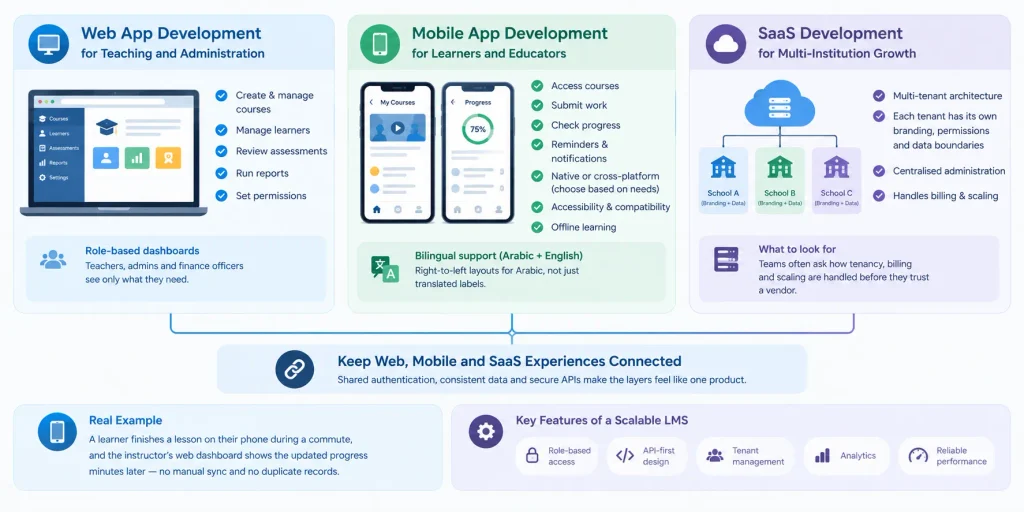
A scalable learning management system works as three connected layers: a web application for teaching and administration, mobile apps for learners and educators, and a SaaS foundation for multi-institution growth.
Web App Development for Teaching and Administration
The web application is usually the operational backbone. It’s where staff create courses, manage learners, review assessments, run reports, and set permissions. Role-based dashboards matter: a teacher, a campus administrator, and a finance officer should each see what they need and nothing more.
Mobile App Development for Learners and Educators
Learners expect to open a course, submit work, or check progress from their phone. Reminders keep engagement up between sessions. Native versus cross-platform depends on performance needs, budget, and your users’ devices. Accessibility, compatibility, and offline learning deserve early attention.
For Dubai and wider UAE audiences, bilingual support is a design requirement, not a bonus. Arabic needs proper right-to-left layouts, not just translated labels.
SaaS Development for Multi-Institution Growth
If you serve several schools, training businesses, or client organisations, a multi-tenant SaaS architecture lets each tenant have its own branding, permissions, and data boundaries while you administer everything centrally. Teams researching a SaaS development company Dubai typically want to see how tenancy, billing, and scaling are handled before they trust a vendor with the foundation.
Keep Web, Mobile, and SaaS Experiences Connected
Shared authentication, consistent data, and secure APIs make the layers feel like one product. A concrete example: a learner finishes a lesson on their phone during a commute, and the instructor’s web dashboard shows the updated progress minutes later, with no manual sync and no duplicate records. That’s LMS integration with mobile apps and web platforms designed in from the start. The core features of a scalable learning management system follow the same logic: role-based access, API-first design, tenant management, analytics, and reliable performance under load.
Quick question: “Do we need a native mobile app, or is a responsive web app enough?”— If learners mostly study at desks, a responsive web app may be enough. Add a mobile app when you need push notifications, offline access, or daily-habit engagement. Many teams phase it: web first, mobile second.
LMS Integration, Security, and Data Management
An LMS rarely works alone. Its value depends on how well it exchanges data with surrounding systems and how carefully it protects that data.
Connect the LMS to Existing Education Systems
APIs can link the LMS to student information systems, CRM, payments, video services, and reporting tools. A student enrols and pays through your website, and the enrolment record flows automatically into the right course assignments and learner profile. No re-typing. No lost records.
Before selecting or building any integration, check compatibility. Does the platform expose the APIs you need? Support single sign-on? Export data in usable formats? Teams scoping custom web application development Dubai projects around an LMS usually find that these checks, done early, prevent the most expensive surprises later.
Protect Learner Data and Manage Access
Good security practice includes role-based permissions, secure authentication, encryption, backups, audit logs, and sensible data-retention rules. But features alone don’t equal compliance.
Education businesses in the UAE should assess their privacy obligations carefully, including the UAE’s federal personal data protection law (Federal Decree-Law No. 45 of 2021) and any sector or free-zone rules that apply to them, such as requirements from education regulators like KHDA for Dubai schools. Learner age groups, data storage locations, and third-party vendors all matter. Major cloud providers operate UAE regions, which can help with data location, but confirm your obligations with legal counsel.
Plan for Maintenance and Reliability
Software needs updates, monitoring, testing, incident response, and a named support owner. Include this in both sides of your comparison. A vendor handles much of it for a ready-made LMS, within its service terms. With a custom platform, you or your development partner own it, so budget accordingly.
How to Choose an LMS for an Education Business
The best way to choose an LMS for an education business is to evaluate current and future requirements, apply a clear build-or-buy framework, and validate the decision before committing budget.
Evaluate Your Current and Future Requirements
Start by assessing:
- Current and projected learner numbers
- Required learning workflows and user roles
- Budget and launch deadline
- Mobile and web application needs
- Integration and data migration requirements
- Security needs, support expectations, and internal technical capacity
Use a Practical Build-or-Buy Decision Framework
| If this describes you… | Then consider… |
|---|---|
| Standard requirements, urgent launch, small initial scope | Ready-made LMS |
| Most needs fit an existing LMS, but a few workflows or integrations need improvement | Configure or extend the existing platform |
| Core workflows, business model, integrations, or product differentiation can’t be supported by available platforms | Custom LMS |
Be honest about which row fits. Many businesses sit in the middle one.
Validate the Decision Before Committing
Run through a short checklist:
- Map your essential user journeys.
- Test the strongest existing platform candidates against them.
- List functionality gaps and the workarounds they’d require.
- Estimate three-to-five-year ownership costs for each route.
- Define success measures: adoption, completion rates, administrative time saved, and support demand.
If a ready-made platform clears the checklist, use it. If the gaps are structural, you’ll have the evidence to justify a custom build and a clear brief for a development partner.
How SISGAIN Helps Education Businesses Build Learning Platforms
SISGAIN is a software development partner that helps education businesses evaluate, design, build, integrate, and scale learning platforms across SaaS, mobile, and web.
Start With Business Requirements, Not a Feature Wishlist
Projects go wrong when they start with features copied from competitors. We start with your business model, user journeys, and growth objectives, then translate them into a clear technical scope, including an honest assessment of whether an existing platform, a configured solution, or custom development is the right path. Sometimes the answer isn’t a custom build, and you’re better off knowing before you spend.
Connect SaaS, Mobile App, and Web App Development
Our capabilities are organised around how learning platforms actually work:
- SaaS development: Multi-tenant architecture, subscription workflows, and scalable platform foundations.
- Mobile app development: Learner, parent, and educator experiences on supported mobile devices. If you’re comparing providers, our mobile application development service Dubai page explains how we approach this.
- Web app development: Administrative portals, course management, dashboards, and reporting.
- Integration: APIs and connections to the third-party systems your operations depend on, where supported and required.
SISGAIN’s published LMS and education app service pages cover custom LMS solutions, mobile learning, virtual classrooms, student information systems, and integrations.
Build for Launch, Adoption, and Future Improvements
A launch is a milestone, not a finish line. Our process covers discovery, UI/UX design, architecture, development, testing, deployment, and post-launch improvement. We define measurable requirements up front and agree a realistic delivery scope, rather than promising outcomes nobody can guarantee.
Conclusion: Choose the LMS That Fits Your Next Stage of Growth
Ready-made platforms suit standard requirements and faster launches. Custom LMS development suits businesses with distinct workflows, deeper integrations, or a differentiated product strategy. Neither is automatically better, and custom isn’t automatically cheaper.
What matters is fit. Assess today’s needs alongside your three-to-five-year roadmap, then test them against real platforms and real costs.
Planning your next education platform? Talk to SISGAIN about your LMS requirements, integration priorities, and the right approach to SaaS, mobile app, and web app development. We’ll help you decide whether to buy, configure, or build.
Frequently Asked Questions
Not always. The better choice depends on workflow complexity, budget, launch timeline, integration needs, and how much control your business requires. Standard needs favour ready-made platforms; distinctive workflows and product ambitions favour custom development.
Cost varies with features, user roles, integrations, platform scope, and support needs. A fair estimate follows a discovery phase, and the best comparison uses three-to-five-year ownership cost.
Often, yes, but it depends on the platform’s available APIs, authentication support, data access, and overall capabilities. Check these technical details before planning a mobile app around an existing LMS.
Some platforms offer multi-tenant or multi-organisation setups. Others need extra development or a different architecture. Confirm how branding, permissions, data separation, and billing are handled for each organisation.
Plan them together around user needs, with shared data and authentication. Delivery can be phased by budget and priority, for example web administration first, then mobile learner access.